Value Suggestions
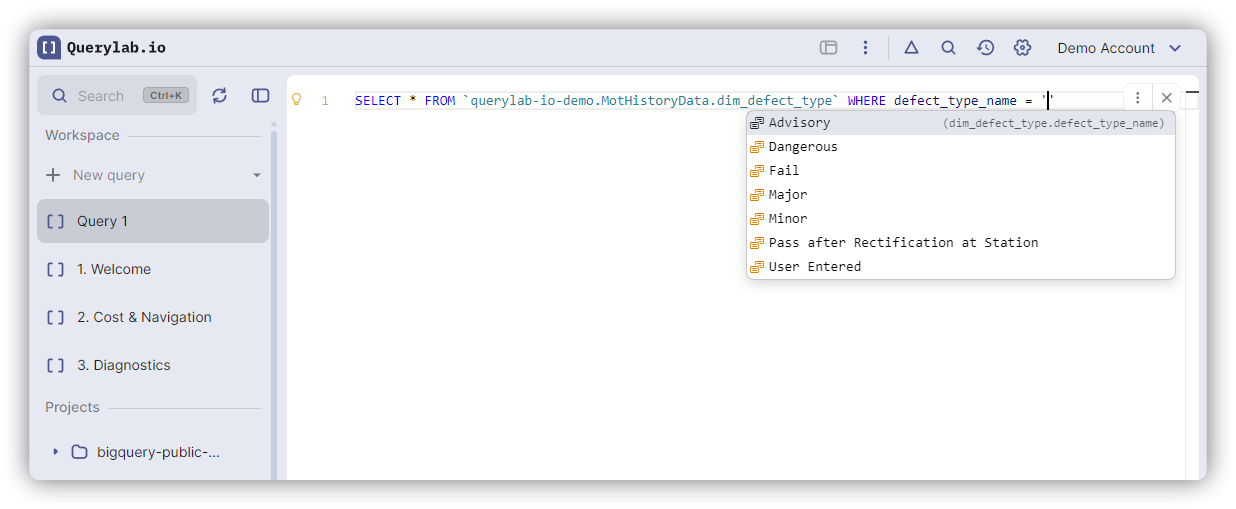
Querylab.io suggests actual values from your tables when writing WHERE, HAVING, and IN clauses.
How It Works
When you type in a filter condition, the editor fetches sample values from the referenced column:
SELECT * FROM events
WHERE event_type = '|'
Completions show actual values from the event_type column:
- 'page_view'
- 'click'
- 'purchase'
Press Tab to accept a value.
Supported Contexts
Value suggestions appear in:
- WHERE clause:
WHERE status = '|' - HAVING clause:
HAVING country = '|' - IN clause:
WHERE status IN ('active', '|')
Works with operators: =, !=, <>, IN, NOT IN
Supported Value Types
All common column types are supported:
-- String values (wrapped in quotes)
WHERE status = '|'

-- Numeric values (no quotes)
WHERE priority = |

-- Date/timestamp values (wrapped in quotes)
WHERE created_date = |
The editor quotes values based on the column type.
Sample Data Source
Value suggestions use sample data from BigQuery:
- No query cost: sample data is fetched at no cost
- Sample size: Up to 100-200 rows
- Caching: First request takes a moment, subsequent requests are instant
Samples may not include all distinct values, especially for high-cardinality columns.
High-Cardinality Columns
For columns with too many distinct values (>1000), value suggestions are skipped:
WHERE user_id = '|' -- No suggestions (millions of unique values)
Limitations
- Tables in FROM clause only - Values come from tables referenced in your query
- Sample data - May miss rare values
- No LIKE patterns - Doesn't suggest wildcard patterns
Related Features
- Auto-Completions - General completion behavior
- Hierarchical Completions - Navigating table schemas