Partial Execution
Execute queries up to a specific CTE or pipe stage to test intermediate results.
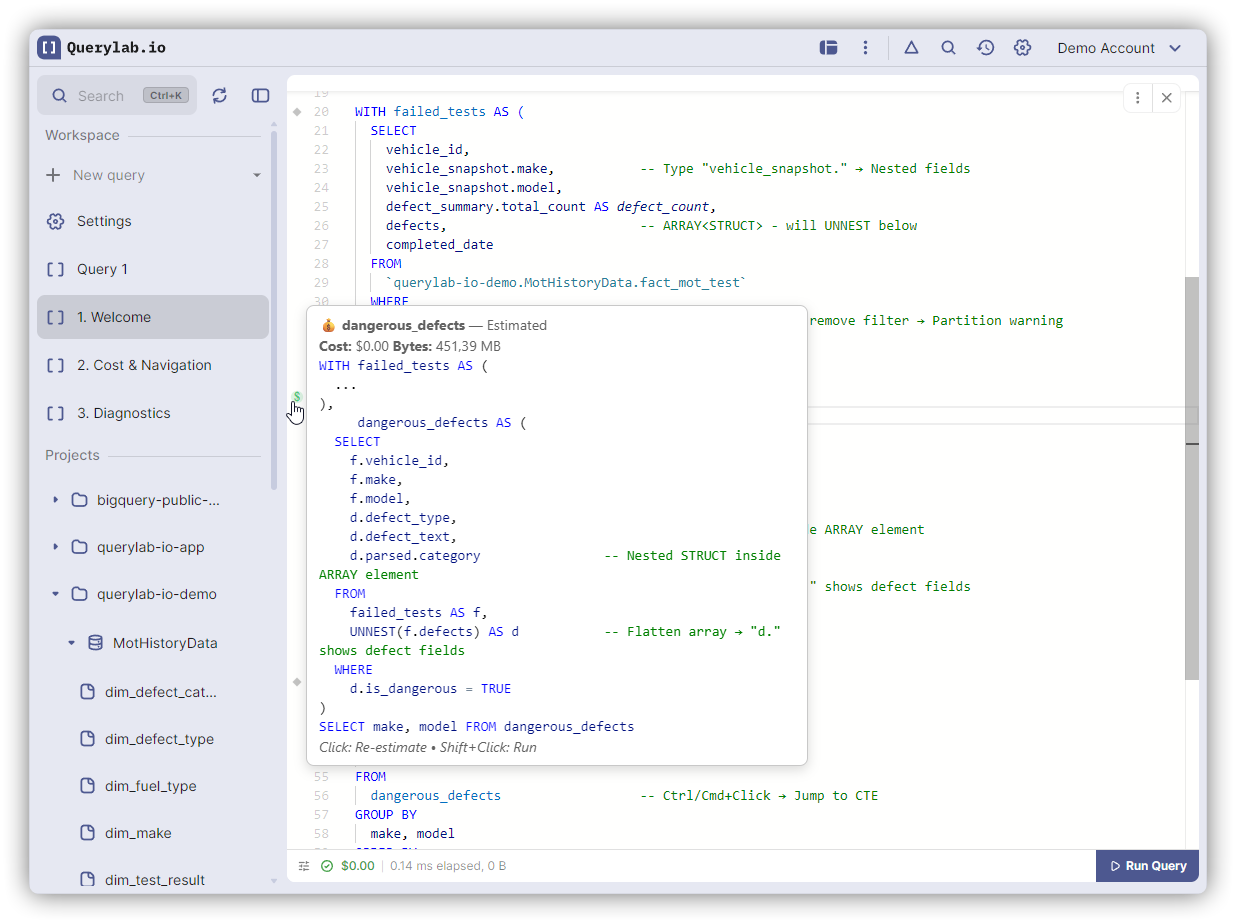
Gutter Icons
Diamond icons (◆) appear in the left margin at each CTE boundary and pipe operator:
Standard SQL with CTEs:
◆ WITH user_events AS (
    SELECT user_id, event_type FROM events
  ),
◆ recent_users AS (
    SELECT user_id, COUNT(*) as event_count
    FROM user_events
    GROUP BY user_id
  )
◆ SELECT * FROM recent_users WHERE event_count > 10;
Pipe Syntax:
◆ FROM events
◆ |> WHERE event_date >= '2024-01-01'
◆ |> SELECT user_id, event_type
◆ |> AGGREGATE COUNT(*) AS event_count GROUP BY user_id
◆ |> WHERE event_count > 10;
Each pipe operator (|>) is an execution point. Click to run the query up to that stage.
Actions
| Action | How |
|---|---|
| Estimate cost | Click gutter icon |
| Execute to this point | Shift+Click gutter icon |
Use Cases
Testing CTEs Step by Step
- Shift+Click first CTE icon → verify data
- Shift+Click next CTE icon → verify transformation
- Run full query when all CTEs validated
Debugging Unexpected Results
Execute to each CTE to find where data goes wrong.
Cost Control
Click (not shift) to estimate cost before executing expensive CTEs.
Debugging Pipe Queries
Pipe syntax makes each |> a checkpoint:
- Execute first pipe to verify source data
- Add filters and execute to that pipe
- Continue building the transformation step by step
How It Works
CTEs: When you Shift+Click on user_events, Querylab.io executes:
WITH user_events AS (
  SELECT user_id, event_type FROM events
)
SELECT * FROM user_events;  -- Auto-added
Pipe Syntax: When you Shift+Click on a pipe operator, Querylab.io executes up to that stage:
-- Click on the SELECT pipe:
FROM events
|> WHERE event_date >= '2024-01-01'
|> SELECT user_id, event_type;  -- Stops here
This lets you see exactly what data flows through each transformation.
Limitations
- Only works on top-level CTEs (not nested WITH)
- Final SELECT also has a gutter icon for full execution