Column-Level Lineage
Trace how columns flow through your query — across CTEs, JOINs, UNNESTs, and VIEWs.
How It Works
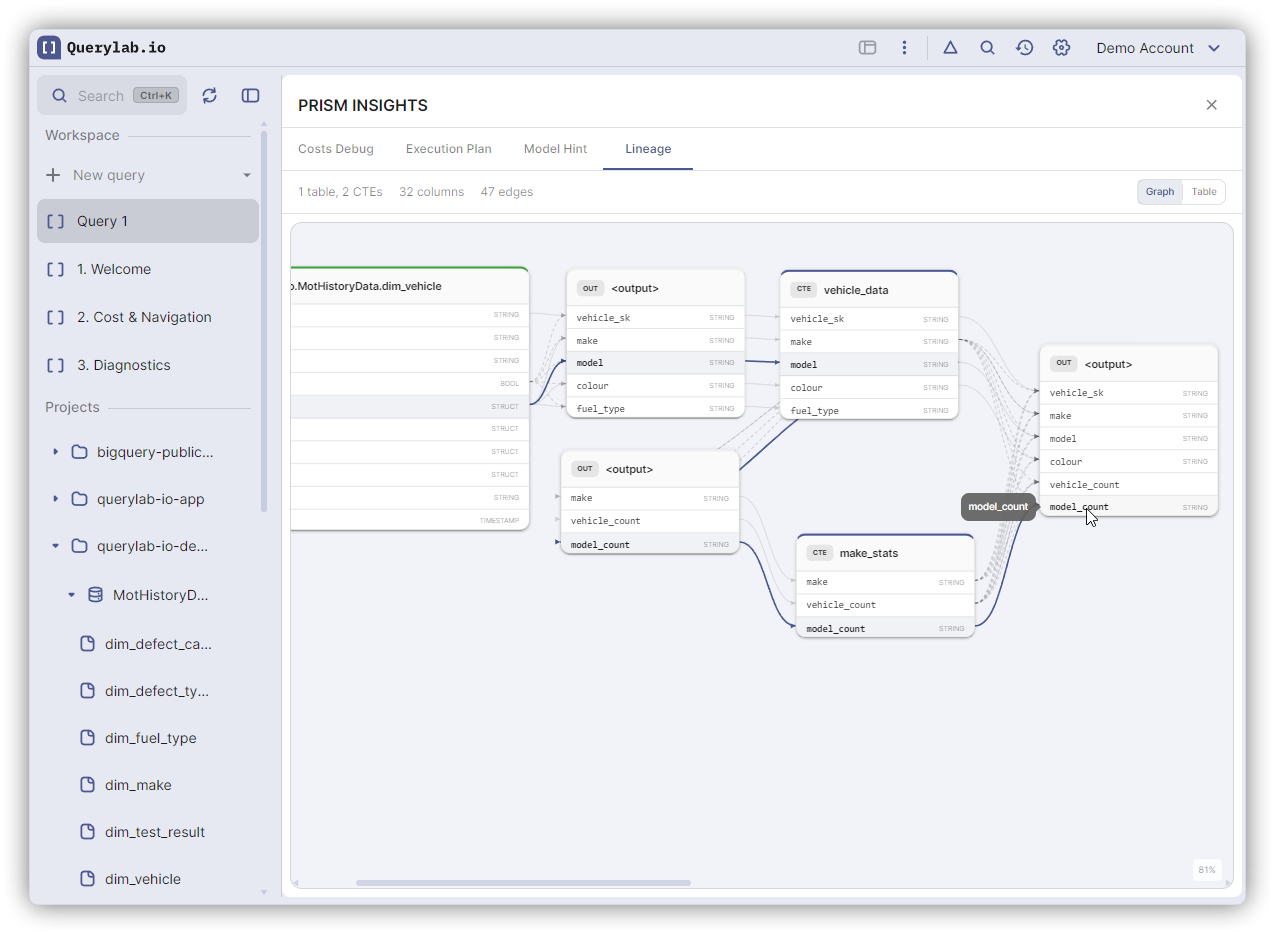
After writing or running a query, open the Prism Insights panel and select "Lineage" from the dropdown. Querylab.io analyzes your SQL and renders a diagram showing how each output column connects to its source tables.
What It Shows
- Column flow: See which source columns feed into each output column
- Transformations: Track columns through renames, expressions, and aggregations
- CTE chains: Follow data through multiple CTE layers
- JOIN connections: See how columns relate across joined tables
- UNNEST expansion: Track array and struct field unpacking
- VIEW expansion: Expands VIEW references to show underlying source columns
Controls
| Action | Result |
|---|---|
| Scroll/Pinch | Zoom in and out |
| Drag | Pan the diagram |
| Click node | Highlight column path |
| Zoom to Fit | Auto-fit diagram to panel |
The diagram auto-refreshes after each query execution.
Summary Bar
A summary bar at the top shows counts of tables, columns, and transformations in the current query.