DDL Operations
Generate DDL statements from the context menu.
Access: Hover over table → Click Actions button (⋮) → SQL Templates
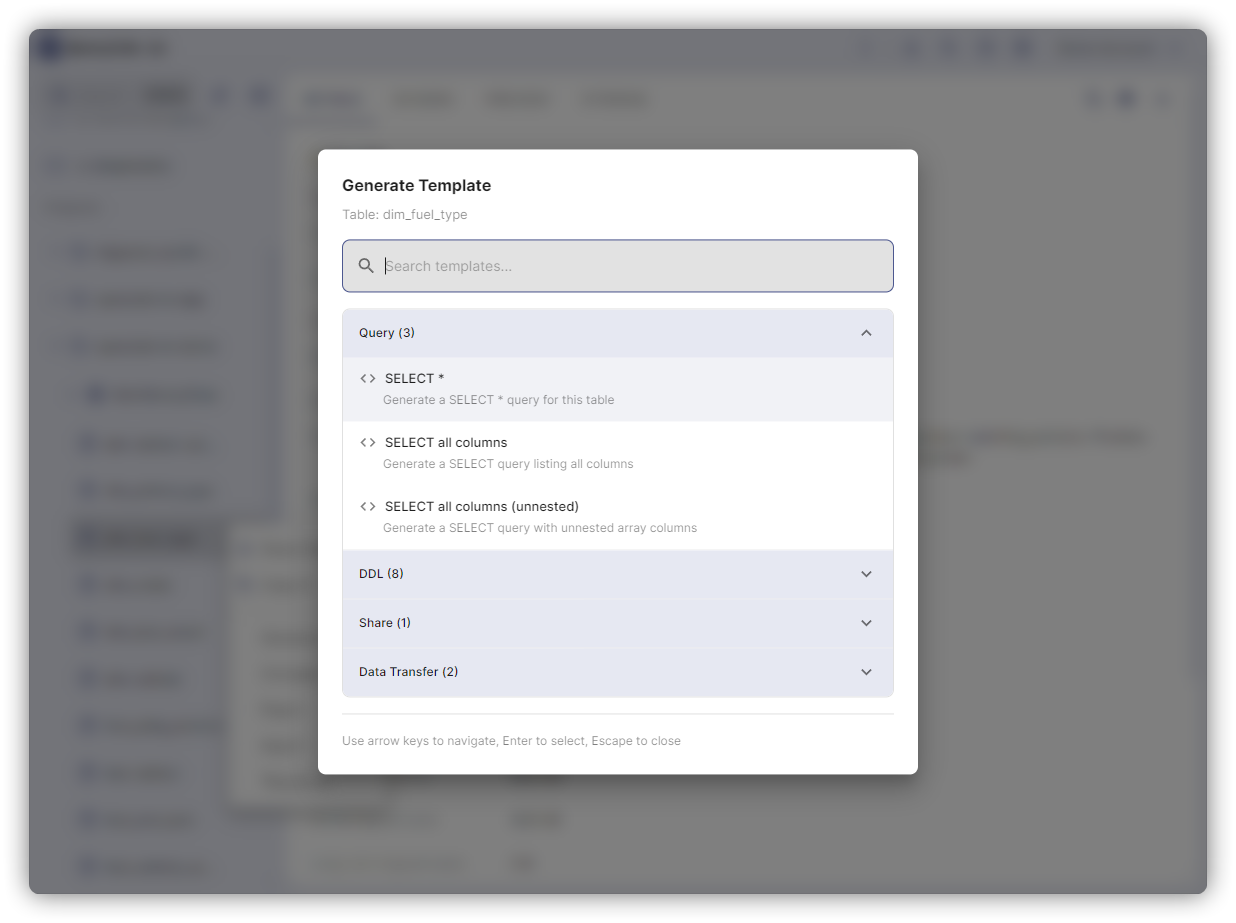
Available Operations
| Operation | What It Does | Cost |
|---|---|---|
| CREATE TABLE (DDL) | Generate full schema DDL | Free |
| SELECT | Query template | Query |
| INSERT INTO | Insert template | Query |
| COPY TABLE | Copy structure + data | Query |
| CLONE TABLE | Lightweight copy (metadata only) | Free |
| TRUNCATE | Delete all rows, keep schema | Free |
| ALTER OPTIONS | Modify table settings | Free |
| RENAME | Change table name | Free |
| DROP | Delete table | Free |
COPY vs CLONE
COPY: Duplicates data (slow, costs query charges)
CREATE TABLE `project.dataset.table_copy` AS
SELECT * FROM `project.dataset.table`
CLONE: Metadata-only, copy-on-write (instant, free)
CREATE TABLE `project.dataset.table_clone`
CLONE `project.dataset.table`
Use CLONE for backups, testing, staging environments.
Common Patterns
Backup with expiration:
CREATE TABLE `project.dataset.table_backup_20250110`
CLONE `project.dataset.table`
OPTIONS(expiration_timestamp = TIMESTAMP_ADD(CURRENT_TIMESTAMP(), INTERVAL 30 DAY))
Clone at specific time:
CREATE TABLE `project.dataset.table_clone`
CLONE `project.dataset.table`
FOR SYSTEM_TIME AS OF TIMESTAMP_SUB(CURRENT_TIMESTAMP(), INTERVAL 1 DAY)
Recover from TRUNCATE:
INSERT INTO `project.dataset.table`
SELECT * FROM `project.dataset.table`
FOR SYSTEM_TIME AS OF TIMESTAMP_SUB(CURRENT_TIMESTAMP(), INTERVAL 1 HOUR)
ALTER OPTIONS
ALTER TABLE `project.dataset.table`
SET OPTIONS(
  description = "Updated description",
  expiration_timestamp = TIMESTAMP("2025-12-31"),
  labels = [("env", "prod")],
  max_time_travel_hours = 168
)
Permissions Required
- CREATE:
bigquery.tables.create - DROP:
bigquery.tables.delete - ALTER:
bigquery.tables.update
Information Schema Templates
Query INFORMATION_SCHEMA views directly from the context menu. Available under SQL Templates → Information Schema.
Tables
Right-click a table → SQL Templates → Information Schema.
| Template | What It Returns |
|---|---|
| Table Columns | Column names, types, modes, and descriptions |
| Column Field Paths | Flattened paths for nested STRUCT/ARRAY fields |
| Partitions | Partition metadata including row counts and storage bytes |
| Table Constraints | Primary key and foreign key constraints |
| Table Options | Description, labels, expiration, and other table-level options |
Datasets
Right-click a dataset → SQL Templates → Information Schema.
| Template | What It Returns |
|---|---|
| List Tables | All tables with type and creation time |
| List Columns | All columns across all tables in the dataset |
| Column Field Paths | Nested field paths for all tables |
| List Views | Views with their SQL definitions |
| Materialized Views | Materialized views with refresh configuration |
| List Routines | User-defined functions and stored procedures |
| Table Options | Table-level options across all tables |
| Table Constraints | PK/FK constraints across all tables |
| Schema Options | Dataset-level options (description, labels, location) |
| Search Indexes | Search indexes defined on tables |
| Row Access Policies | Row-level security policies |
Projects
Right-click a project → SQL Templates → Information Schema.
| Template | What It Returns |
|---|---|
| Storage Analysis | Per-table costs (logical vs physical), billing model, compression ratio, usage check, time travel + fail-safe |
| Compute Cost Analysis | Query patterns by cost, source detection (dbt/Dataform/Looker), edition, on-demand vs slot tier comparison |
| Slot Utilization Timeline | Reservation slot capacity usage over time |
| Failed Queries | Recent query errors with error messages |
| Partitioning & Clustering Audit | Tables that would benefit from partitioning or clustering |
| Top Expensive Tables | Tables ranked by combined query + storage cost |