Inline Edit
Edit SQL using natural language. Preview the diff before accepting.
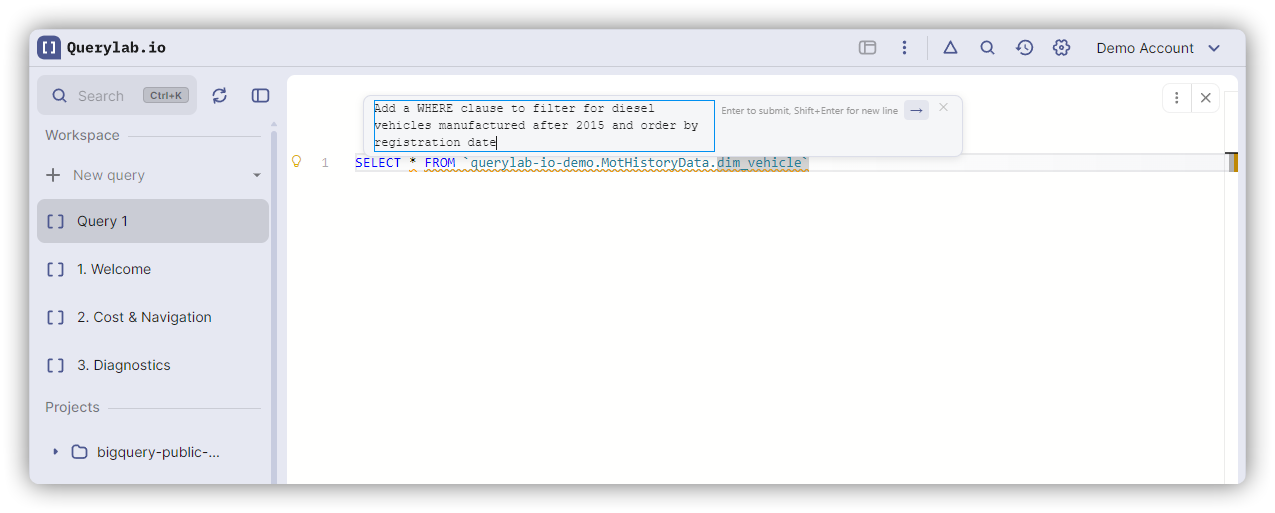
How It Works
- Select the SQL you want to change (or place your cursor in a statement)
- Press
Ctrl+Win+I(Windows) /Ctrl+Cmd+I(Mac), or right-click and select "Edit with AI" - Describe what you want to change in the input field
- Review the diff overlay showing additions and deletions
- Accept or reject the changes
Examples
| You type | What happens |
|---|---|
| "add a WHERE clause for active users" | Inserts WHERE status = 'active' |
| "convert to use a CTE" | Restructures query with WITH clause |
| "add column aliases" | Adds AS clauses to SELECT columns |
| "optimize for cost" | Rewrites to reduce scanned data |
In Notebooks
Inline edit works in notebook cells too. Select SQL in any cell and use the same shortcut.
Notes
- The AI validates its proposed changes against BigQuery SQL syntax before showing the diff
- You see the diff before changes are applied
- Press
Escapeto dismiss without applying